
Multi-Monitor Update and Greeter Prototype

Canonical
on 31 January 2012
Tags: Design , multi-monitor , Multi-screen , prototype , Ubuntu
There are several improvements to the specification (including more elegant discoverability of the Greeter login across displays, improved placement of windows upon removal of a display and a more feasible solution for providing missing resolutions in the Display Preferences panel).
The document has also been restructured in places, with new and extended sections, specifying in further detail how elements such as the Guest Session, Launcher, Spread and mouse cursor should work in a multi-monitor setup.
We have also created a prototype to explore how the Greeter works across multiple displays.
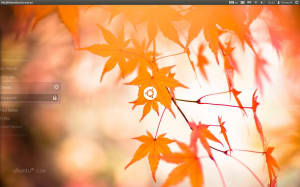
Multi-Monitor Greeter Prototype
You can check out the prototype by downloading it from here: http://ubuntuone.com/6MHk2xkW5L3Bl9pGsj10z4
Press Escape to exit the prototype.
Press Space to check out the prototype against a number of different desktop backgrounds (will cycle through the images in /usr/share/backgrounds)
Hold down Alt to show numbers on each display. Still holding down Alt, you can then tap a number to move the Greeter across to that numbered display, allowing you to change the display you log in with, without using the mouse. In the final implementation, the Super key will be used rather than the Alt key, but I can’t bind to that keyboard shortcut in my prototype.
Please let us know your thoughts on the updated specification and the new Greeter prototype.
Talk to us today
Interested in running Ubuntu in your organisation?
Newsletter signup
Related posts
Ubuntu Summit 26.04: connected by open source
What an incredible experience! Ubuntu Summit 26.04 has officially drawn to a close, but the energy from our global community is still buzzing – in the...
Template: Streamlining open source design contributions
As designers working at Canonical, we’re always thinking about open source. We believe that encouraging more designers to contribute to open source benefits...
A decade of Ubuntu on IBM Z and IBM LinuxONE
This year we celebrate a decade of Ubuntu Server support on the s390x architecture: marking a long-standing collaboration between Canonical and IBM that began...